Showing posts with label wordpress. Show all posts

Tuesday, 2 October 2012

How To Speed Up Your Bluehost Hosted Blog Site

If your small wordpress blog or site is hosted on bluehost it is probably hosted on a shared server. A shared server means your blog is sharing resources with millions of other blog sites.

Sharing a server with other small blogs is not a problem on bluehost because they are a top notch web hosting company. Bluehost have heavily invested on their servers and people to ensure all hosted websites are running like clock work.

While Bluehost do a good job to provide fast speeds on their side, it is up to you to do  what is necessary to make sure your wordpress blog site is racing like a Ferrari.

1. Resize Those Images
Images should be minimized to the right size without destroying the quality. I use photoshop to reduce the size of the images. The latest version of wordpress allows you to reduce the size of images immediately after uploading them.

2. Use a Lean Wordpress Theme
A good example of a fast loading wordpress theme is Twenty Ten/Twenty Eleven (aka the default WP themes). The reason is, it is simple and lean. Doesn't have fancy designs with tons of images, lines and colors that hog the speed.

A fancy theme may look good but they sacrifice load times.

3. Optimize your homepage
Keep things to a minimum on your homepage
Show excerpts instead of full posts 
Reduce the number of posts on the page (5-7 is an okay number) 

4. Remove Inactive plugins
If you no longer use a plugin, remove it from your installation.  Keeping it is  a poor use of disk space. 

5. Remove duplicate plugins
It is pointless to use multiple SEO plugins. They all do a similar job. MY recommended SEO plugin is all in one SEO plugin. 

6. Use a few plugins as possible 
The truth is the more plugins you have the slower the blog. 

7. Beware of Auto Link Plugins
Auto links plugins are highly valued because of their SEO value but they are a speed hog. Auto links take time to calculate. They have to go through the whole database each time a link is created. All that sending is eating into your speed. 

8. Keep your wordpress blog updated
Previously you needed to login to your bluehost cpanel to update your blog but these days you do it inside wordpress. There is no reason for leaving your blog out dated other than sheer lazyness. 

Remember this days Google rates sites based on speed / load times. Another reason to make sure your bluehost hosted blog is up to speed!

Thursday, 14 June 2012

Why Your Wordpress Blog is Loading Slowly & How To Make It Load Faster

The common reasons why a wordpress blog loads slowly are a poor theme, dubious hosting, extra widgets and plugins and heavy images.

If you notice your wordpress blog homepage takes a long time to load, you need to get to the bottom of the issue and act. Google these days is taking into consideration a site load speed when evaluating websites. Expect low rankings if your wordpress blog load times is long.

Why Your Wordpress Blog is Loading Slowly and How To Make It Load Faster

In this article I will share with you how to detect the problem and fix it.

Problem With Your Theme
A theme can break or make your site. The beauty of Wordpress is a pool of thousands of free themes. but the downside of that is there are a few poorly coded themes. Always visit your blog homepage after you install a new theme. If you notice the blog is loading slowly compared to before, know the theme has a problem.

Problem with your plugins. 
Plugins that serve ads are notoriously responsible for slowing a site down. Visit your site homepage after installing any new plugin. If you notice your wordpress blog is loading slowly compared to before, know the plugin has a problem. 

If you blog is running so many plugins it will impact on load times. The way to speed up the blog is remove unnecessary plugins or duplicate plugins.

Your Hosting Servers Slowing Your blog.
Hosting plays an important role in your blog’s loading speed. Many new bloggers ignore this, but adjusting hosting can have a big impact on increasing your blog speed. Majority of freelance bloggers use shared hosting which is cheap but shared hosting can slow down load times when the demands on the shared server are high. 

Images Slowing a Wordpress Blog
Many bloggers don’t focus on optimizing blog images, but it’s a very effective way to increase your blog’s loading speed. There are many, many plugins that can help you to optimize blog images, but  recommend you always resize your images using Wordpress uploader. 

Use W3 Total Cache Plugin

W3 Total Cache is a must-have plugin for any WordPress user. W3 Total Cache is plugin created to speed up a Wordpress blog load times. It generates HTML files that are served directly by Apache, without processing comparatively heavy PHP scripts. It’s compatible with most servers and server configurations, and gives you the choice of creating the cache on your own server.

Thursday, 7 June 2012

6 Free & Premium Wordpress E-Commerce Template

Wordpress is popularly known as a blogging platform but the truth is wordpress can also be used to build e-commerce websites or online store. The look and feel of your store can be enhanced by installing an e-commerce wordpress templates. There are two types of wordpress templates, free and premium.

The following is collection of 6 e-commerce Wordpress templates that you can download for free or purchase and upload them to your site.

On the blogging platform, free themes out number the premium themes. but when it comes to e-commerce wordpress templates it is the other way round. There are few free templates but hundreds of premium templates.

The Best Wordpress E-commerce Templates 
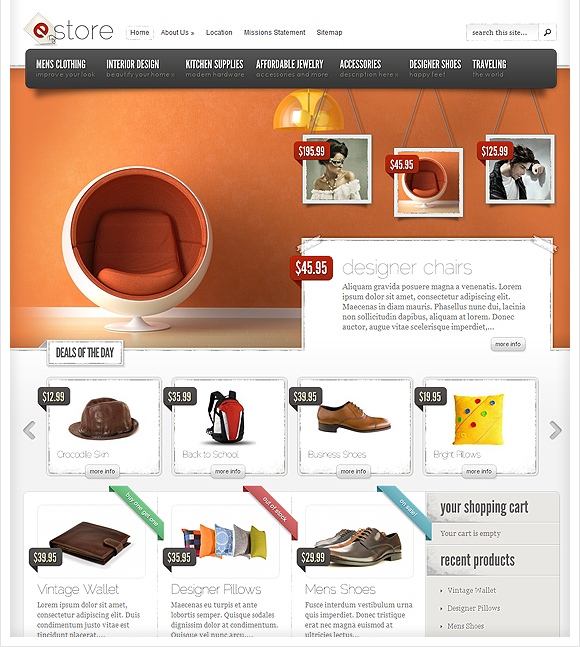
Estore Theme

eStore wordpress template provides an elegant solution for those looking to sell products online. The theme is easy to configure, and offers integration options with some of the most popular (and free) ecommerce plugins, including eShop and Simple PayPal Shopping cart. Also, due to the open-ended nature of the design, adding support for additional shopping carts won't cause a headache. If you are ready to bring your business online, then get started today with eStore!

estore is available for just $39 at eleganttheme.

Boutique Template 

Boutiques give you the power to open your own online storefront. The theme has been built to integrate with some of the most popular eCommerce plugins available, allowing people to use their favorite system without any conflicts.

Boutique theme is available for just $39 from elegantthemes.

Download These 3 Free Wordpress E-commerce Templates

Teeshort Theme
This green color free e-commerce wordpress template is designed for a store designed to sell T-shirts. it can also be sued to sell any kind of clothing online, anything from shorts, lingerie and shoes.
Teeshort is designed by woocommerce themes. You can choose from basic theme and standard theme. The basic them can be downloaded free of charge while the price of standard theme is $75. The main difference being the standard template has life time support.

Velvet Sky Wordpress E-commerceTheme
This free e-commerce wordpress template is women centric. Good for selling women products. The warm, natural brown colours within the theme portray much comfort and will hopefully provide your customers with a very calm and engaging environment in which they can find the items they’re searching for in no time.
Designed by Dapurpixel and Promoted by smashing magazine. If you are planning to selling lipstick and perfume to women, then consider velvet sky theme.

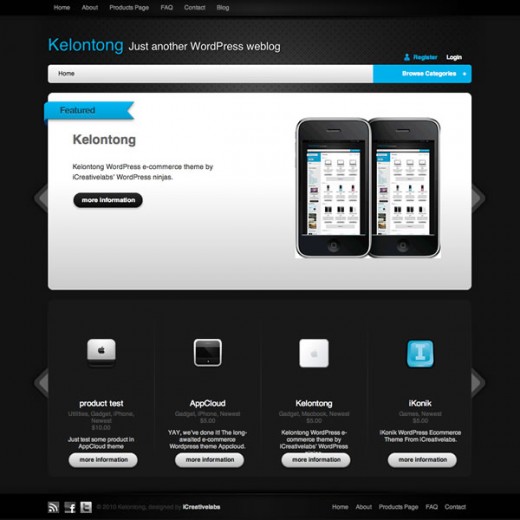
Kelontong Wordpress E-commerce Theme
This free e-commerce wordpress template was designed with apple in mind but with a little bit of creativity it can be perfect for selling electronic goods such as camera, phone and computer accesories.
The kelontong is designed by iCreativeLabs.

3 Premium Wordpress E-commerce Templates.

The Vineyard: A WordPress eCommerce Theme
This premium e-commerce template is a perfect theme for a site that sells wine online. The Vineyard is a complete, flexable and beautiful eCommerce WordPress theme. The specificly designed store pages will show off your products perfectly. It fully supports the cart66 plugin for a complete webshop experience. Packed with options, custom widgets and shortcodes, this theme will not dissapoint!


The theme is promoted by Theme Forest.

Icarus Business eCommerce Template
This e-commerce wordpress template is perfect for an online furniture store. Good design for showcasing your catalog.


Another e-commerce wordpress theme from Theme Forest.

Store Wordpress ecommerce Template
This wordpress e-commerce template is good for selling organic product. If you sell those multi level marketing products you may consider this theme. The Store template is a great ecommerce WordPress theme, with a really good-looking and functional interface; it’s easy-to install and maintain with accessible backend administration.


The theme’s creators are available for pre-sales questions and customer support.

Saturday, 26 May 2012

How to create a Wordpress site

This week on our wordpress classes series we focus on how to create a wordpress site. The great thing about Wordpress is that it is customizable. It starts out with a very plain look, but you can customize that look to reflect your style.

In this class you will learn a variety of useful techniques to make the most of wordpress. And, by the time the presentation ends, you will gain enough knowledge to create your own Wordpress site.

This video presentation will teach you how create or build a Wordpress site, how to create a page, how to create posts, how to choose a theme, how to install a plug-in and how to set up widgets,

It’s an informal real-time presentation in-case of any questions please leave them in the comments section and I will gladly reply

Sunday, 13 May 2012

Wordpress Video Guide For Beginners

Wordpress is the most popular blogging platform in the world. You can use wordpress to set up you blog or even build a website. The reasons why wordpress is very populare are:- 
  • Easy to use, you don't need technical knowledge
  • It is free - the software is provided for free by wordpress.org
  • You get plenty of support when you run into problem. If you ever run into a problem when using Wordpress you just need to Google the problem and you will find someone with a solution. 
  • Thousands of themes - There are thousand of designs that you can choose to match your preference or niche. 
  • Thousands of plugins - Wordpress has many plugins that you can add to your blog to enhance the performance.
Wordpress Video Guide For Beginners

Those are the main advantages of choosing wordpress. If you are getting started and have decided to use wordpress the following video will show you the basics that every beginner needs to know; Enjoy

Wordpress Video Guide For Beginners - Part 1


Wordpress Video Guide for Beginners Part 2

Wednesday, 18 April 2012

10 Min Video Demo On How To Build A Church Website Using Wordpress

In our series How To Build Your Own website, this post will focus on How To Build A Church Website Using Wordpress. Wordpress is renowned with blogging but it can be used to create a Website.

Get Your Free Church Domain Name

The first step in creating a church website is to purchase the domain. Domain names cost anywhere from $10/year to $50/year but I recommend you advantage of a free domain name from bluehost webhosting. Bluehost webhosting will give you a free domain when you sign up for there web hosting. They have a cheap web hosting plan for church website that cost $6.95/m.

The domain name should preferably be the name of your church. If that is not available you can try having dashes between the words or adding initials or location or interchanging the words.

Now Watch this 10 minutes video presentation on how to build a church website with wordpress.