One of the hardest thing in blogging is to get repeat visitors. The visitors who visit your site for the first time and they keep returning for more.
I use the following tactics to get repeat visitors to my blog sites.
1. Staying Relevant
Many people make mistake of promoting so many affiliate products at the expense of writing useful articles. I try to always stay relevant with topics that are useful and informative.
2. Being Specific
General and broad subjects are hard to cover for most blogs. If a site is about playing better golf, i don't chime in with my opinions on NBA.
Narrowing your topic helps you reach specific readers that are 100% focused on that particular topic. These people will come back every day to see what you have to offer.
3. Plan for Months Not Days
I have a blog editorial calendar that stretches 2 months in advance.
Planning months in advance allows you to be smart about topic selection. You’ll be able to see natural ways to group your blog posts and create a steady, consistent rhythm. This planning results in steady repeat traffic.
4. Hang Out with Your readers on Facebook and Twitter
Don't use Facebook and other social media as just outlets to churn out your content. I make sure I show up and actively participate on those platforms.
5. Connect with Regular Readers
I make an effort to know my regular readers. If they live comments on my blog, I reach out to them via email or a comment in their blogs. The first contact is just to say a big thank you for leaving a comment on my blog. This personal connection helps cement authentic relationships and create opportunities for partnering and sharing resources.
6. Publish Consistently
It’s difficult to build a repeat readership with a sporadic publishing schedule. Pick a publishing frequency and schedule and stick with it. Your consistency says that you care about your reader’s time and you take your blog seriously.
Friday, 22 June 2012

Wednesday, 20 June 2012
Writers Block Help : Tips To Get Your Creative Juices Flowing
Writers block affects all bloggers. Writers block is not a bad thing. My theory is, this is a way our mind tells us it has had enough and it wants a rest.
Writers Block Help : Tips To Get Your Creative Juices Flowing
These are the things I do whenever I suffer from writers block.
Relax
Drink a glass of warm milk or herbal tea.
Writers Block Help : Tips To Get Your Creative Juices Flowing
These are the things I do whenever I suffer from writers block.
Relax
Drink a glass of warm milk or herbal tea.
Wiggle your toes. Reflexology says that your feet similar to a control panel for the rest of your body. Channels of energy end up in the feet and every part of the body is connected with these stinky friends.
When you wiggle your toes, you stimulate your body, as it allows energy to flow freely and smoothly. So, wiggle your worries away!
Rub your tummy. This soothes the digestive system, relaxing your body eventually.
Get Plenty Of Sleep
A good night's sleep makes you feel energized and alert the next day.
Inspire Yourself
Read articles in your niche. Go outside the blogging sphere and read newspapers and magazines. The more you read the more ideas you will get to kick start your blogging.
Stop Trying So Hard and Surrender
Writers block is like insomnia. The harder you try to get to sleep the more awake you are. Accept your mind has hard enough and it needs a rest. The more you rest the more energy you will have.
Restore peace to you mind
Of course, nothing beats the idea of having peace of mind. A calm mind and a happy heart are the keys to good and healthy life.
So, let go of your worries and forgive your enemies. Indeed, having peace of mind can send your creative juices flowing.
Here is to a creative blogging journey.
My Favorite Wordpress Real Estate Templates
I am working on a new Real Estate site and I have been looking around for an awesome template. I have installed Wordpress and what is remaining is to install a Wordpress real estate template.
Free Templates Vs Premium Templates
I have Googled for some of the best wordpress real estate templates and I have found a few premium real estate templates and plenty of free real estate templates. The following are my favorites.
Premium Real Estate Wordpress Templates
Elegant Estate Wordpress Real Estate Template

Elegant estate template for wordpress is from elegant theme. ElegantEstate turns your WordPress site into a full-feature real estate website. The template makes browsing your listings easy, and adds special integration features for property info, photos, Google Maps and more. Help increase sales by establishing an elegant and professional online presence today. This gorgeous template is available for rock bottom price of $39. Buy it from Elegant Themes.
AgentPress Real Estate Wordpress Template

The price of this paid Real Estate template is $99. Features include, 5 color styles, 6 layout options, custom background, custom header, custom menus, featured images, fixed width, theme options, threaded comments.
Premium Benefits:-
Includes the Genesis Framework
Includes the AgentPress Theme
Get Instant Access
Unlimited Updates, Support & Sites
Get this template from Agentpress website.
Smooth Real Estate Wordpress Template
 This wordpress template is designed and distributed by Gorilla Themes. Features include complete with Multi Category Search, Google Maps Integration, Agent Photo and Logo uploader that offers a professional and extremely affordable solution for Realtors and Agents to showcase their properties with ease.
Add your listings with the extremely easy and flexible Dynamic Real Estate Framework, edit-add-modify-delete all features, labels and values within the WordPress administration and upload unlimited photos to your galleries with latest WordPress features.
Buy this real estate wordpress template from Gorilla Themes for $39.95.
Free Real Estate Wordpress Templates.
Real Estate Clean Template
 This free wordpress theme is well designed and just by looking at it you can tell it is about houses.
Moving Time Template

This templates has a beautiful header. The links to various pages are prominently displayed top left side.
Download Real Estate Themes from wordpress.org
You can go to the official download page of wordpress templates at http://wordpress.org/extend/themes/
Free Templates Vs Premium Templates
I have Googled for some of the best wordpress real estate templates and I have found a few premium real estate templates and plenty of free real estate templates. The following are my favorites.
Premium Real Estate Wordpress Templates
Elegant Estate Wordpress Real Estate Template

Elegant estate template for wordpress is from elegant theme. ElegantEstate turns your WordPress site into a full-feature real estate website. The template makes browsing your listings easy, and adds special integration features for property info, photos, Google Maps and more. Help increase sales by establishing an elegant and professional online presence today. This gorgeous template is available for rock bottom price of $39. Buy it from Elegant Themes.
AgentPress Real Estate Wordpress Template

The price of this paid Real Estate template is $99. Features include, 5 color styles, 6 layout options, custom background, custom header, custom menus, featured images, fixed width, theme options, threaded comments.
Premium Benefits:-
Includes the Genesis Framework
Includes the AgentPress Theme
Get Instant Access
Unlimited Updates, Support & Sites
Get this template from Agentpress website.
Smooth Real Estate Wordpress Template

Add your listings with the extremely easy and flexible Dynamic Real Estate Framework, edit-add-modify-delete all features, labels and values within the WordPress administration and upload unlimited photos to your galleries with latest WordPress features.
Buy this real estate wordpress template from Gorilla Themes for $39.95.
Free Real Estate Wordpress Templates.
Real Estate Clean Template

Moving Time Template

This templates has a beautiful header. The links to various pages are prominently displayed top left side.
Download Real Estate Themes from wordpress.org
You can go to the official download page of wordpress templates at http://wordpress.org/extend/themes/
Monday, 18 June 2012
Voted As Best Photography Wordpress Template
If you are looking for a photography wordpress template to install in your photography site you need to go with a template that meets high standard.
This is what you should look for in a photography wordpress template.
The main differences between good paid templates and good free templates is the ability to make these customizations without having to dig deep into the code as well as the SEO benefits.
If you buy a theme, it is extremely helpful if they have a support forum and are regularly updating the theme to handle changing versions of WordPress. Also updates of the theme should not overwrite customizations you’ve made.
Photocrati Wordpress Template
One premium photography Wordpress template with lifetime support and annual updates is Photocrati. This template is reputed to be one of the best Photography Wordpress template.

Features:
The world’s most popular photography WordPress template.
You Can Purchase this awesome template at Photocratic Website for just $89
This is what you should look for in a photography wordpress template.
- Layout choices (The template should allow you to choose a different layout per page i.e. sidebars, full width)
- SEO (A template that allows customizing title tags, keywords, etc)
- CSS customization ( You should be able to easily change font styles, font sizes, link colors, etc without touching the CSS editor)
- The template should have long time support.
The main differences between good paid templates and good free templates is the ability to make these customizations without having to dig deep into the code as well as the SEO benefits.
If you buy a theme, it is extremely helpful if they have a support forum and are regularly updating the theme to handle changing versions of WordPress. Also updates of the theme should not overwrite customizations you’ve made.
Photocrati Wordpress Template
One premium photography Wordpress template with lifetime support and annual updates is Photocrati. This template is reputed to be one of the best Photography Wordpress template.
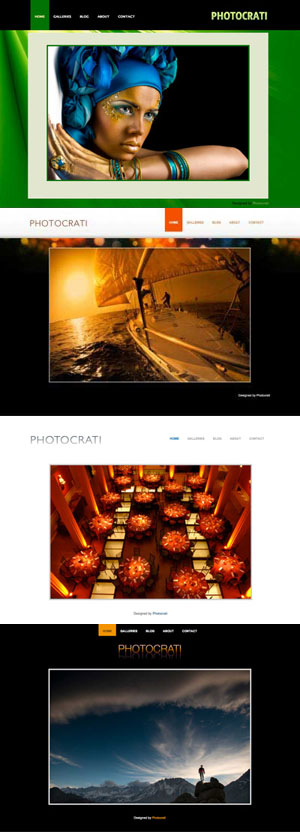
Features:
The world’s most popular photography WordPress template.
Blog + website + galleries.
60 styles out of the box.
The only WordPress theme with built-in ecommerce galleries.
iPad/iPhone compatibility.
Strong copyright protection.
LIFETIME rights to use theme.
ONE YEAR of updates and support.
You Can Purchase this awesome template at Photocratic Website for just $89
Sunday, 17 June 2012
Best Birth Photography Wordpress Theme
When choosing a wordpress theme for your birth photography website I recommend you purchase a premium theme over a free theme.
A Premium theme comes with A+ grade support which is missing in Free themes. This is because the developers build Premium themes as a means of livelihood and thus tend to provide excellent grade support.
Premium themes also have several unique features that are otherwise lacking in Free themes. Plus, due to stiff competition, theme providers are working hard to make their offerings the best of the lot and thus, Premium themes happen to be super-rich in features.
Premium themes generally pay great attention to details. In fact, they often have better tweaks for settings such as SEO than their Free counterparts.
Unlike Free themes, Premium themes are not so common and this can lend a unique appeal to your birth photography website.
One theme designed with photography in mind is Photocrati.
This photography wordpress theme comes with different colors.
Although designed with general photography in mind. This template would be perfect for your birth photography site.
Features:
The world’s most popular photography WordPress theme.
You Can Purchase these awesome theme at Photocratic Website for just $89
A Premium theme comes with A+ grade support which is missing in Free themes. This is because the developers build Premium themes as a means of livelihood and thus tend to provide excellent grade support.
Premium themes also have several unique features that are otherwise lacking in Free themes. Plus, due to stiff competition, theme providers are working hard to make their offerings the best of the lot and thus, Premium themes happen to be super-rich in features.
Premium themes generally pay great attention to details. In fact, they often have better tweaks for settings such as SEO than their Free counterparts.
Unlike Free themes, Premium themes are not so common and this can lend a unique appeal to your birth photography website.
One theme designed with photography in mind is Photocrati.
This photography wordpress theme comes with different colors.
Although designed with general photography in mind. This template would be perfect for your birth photography site.
Features:
The world’s most popular photography WordPress theme.
Blog + website + galleries.
60 styles out of the box.
The only WordPress theme with built-in ecommerce galleries.
iPad/iPhone compatibility.
Strong copyright protection.
LIFETIME rights to use theme.
ONE YEAR of updates and support.
You Can Purchase these awesome theme at Photocratic Website for just $89 Setting Up A Successful Birth Photography Website
If you are a birth photographer you need to set up your website quickly. According to a New York Times article, birth photography industry is growing pretty fast and competition is getting tight. Having a website is the best way to beat your competition.
The fact is, these days people are doing online research on vendors before meeting them. You need to make sure that when mothers and fathers go online to research on best birth photographers they will find you and not your competition.
What You Need To Know So That Online Visitors Find You And Not Your Rivals.
If you Google the words "Birth Photographer" the following website comes top http://www.dfwbirthphotographer.com. One reason is this site is quoted as an authority in birth photography niche from this New York Times article. That is the secret of Google ranking. Getting power house brands to link to your site. You may never get a link from New York Times but you can get one from local magazines, enzines or newspaper. Don't go asking for a link because you will be turned down. Try offering them an interesting image on birth photography and only ask for a link to your site from there website.
How they link to you matters. If you cared to look at that NY Times article you will see our example site was linked with the Keywords "Birth Photographer" Choose appropriate Keywords.
According to Google Keyword tool, there are 1900 monthly searches for Birth photographer and nearly 300,000 searches for birth photography. My advise is you should try to rank for keywords related to your area. e.g birth photographer Los Angeles or birth photographer Seattle etc. Leave the broad terms and try to rank number one in your location.
Get a Free Domain Name for Your Birth Photography Site
Include the keywords birth photographer in your domain name. Something like www.yourlocationbirthphotographer.com. There is evidence that shows having a keyword in your domain name may boost your ranking on Google search engine. Domain names cost between $10 - $20 a year but I recommend you get a free domain name from Bluehost or web hosting hub. These two site hosting companies will give you a free domain name when your purchase web hosting from them.
Make Sure You Have A well Designed Birth Photography Website
My recommendation is build, set up or create your birth photography site using Wordpress. It is free and easy to use. If you have never used wordpress before, go to www.wordpress.com and register for a free blog site. Use that free blog to learn how wordpress work. I don't recommend you use it for business because it will look so unprofessional. Once you get comfortable, you can switch to a self hosted site.
For a very well designed wordpress template, check out my post on Best Birth Photography wordpress theme.
The fact is, these days people are doing online research on vendors before meeting them. You need to make sure that when mothers and fathers go online to research on best birth photographers they will find you and not your competition.
What You Need To Know So That Online Visitors Find You And Not Your Rivals.
If you Google the words "Birth Photographer" the following website comes top http://www.dfwbirthphotographer.com. One reason is this site is quoted as an authority in birth photography niche from this New York Times article. That is the secret of Google ranking. Getting power house brands to link to your site. You may never get a link from New York Times but you can get one from local magazines, enzines or newspaper. Don't go asking for a link because you will be turned down. Try offering them an interesting image on birth photography and only ask for a link to your site from there website.
How they link to you matters. If you cared to look at that NY Times article you will see our example site was linked with the Keywords "Birth Photographer" Choose appropriate Keywords.
According to Google Keyword tool, there are 1900 monthly searches for Birth photographer and nearly 300,000 searches for birth photography. My advise is you should try to rank for keywords related to your area. e.g birth photographer Los Angeles or birth photographer Seattle etc. Leave the broad terms and try to rank number one in your location.
Get a Free Domain Name for Your Birth Photography Site
Include the keywords birth photographer in your domain name. Something like www.yourlocationbirthphotographer.com. There is evidence that shows having a keyword in your domain name may boost your ranking on Google search engine. Domain names cost between $10 - $20 a year but I recommend you get a free domain name from Bluehost or web hosting hub. These two site hosting companies will give you a free domain name when your purchase web hosting from them.
Make Sure You Have A well Designed Birth Photography Website
My recommendation is build, set up or create your birth photography site using Wordpress. It is free and easy to use. If you have never used wordpress before, go to www.wordpress.com and register for a free blog site. Use that free blog to learn how wordpress work. I don't recommend you use it for business because it will look so unprofessional. Once you get comfortable, you can switch to a self hosted site.
For a very well designed wordpress template, check out my post on Best Birth Photography wordpress theme.
Saturday, 16 June 2012
Food Blog Traffic Secrets From 9 Yr Old Food Blogger With 2 Million Hits
Getting traffic to a blog is hard work but a 9 year old food blogger made it look so easy when she got two million hits in unbelievable 6 weeks of blogging.
The nine-year-old blogger is Martha Payne from Scotland. Martha set up a blog as a writing project and to help raise money for a school-meals charity and then she did something that brought a flood of visitors.
Martha Food Blog Traffic Tips
The girl started posting images of uninspiring school meals — one consisted of two croquettes, a plain cheeseburger, three slices of cucumber and a lollipop — These images drew international attention.
One of the food pictures.

Martha, who lives in the coastal town of Lochgilphead, about 210 kilometres west of Edinburgh, gave each meal a “food-o-meter” rating, and offered an assessment of its contents.
“I’d really like to know where the chicken comes from,” she wrote in one entry about having chicken fajitas for lunch, “so I am going to write to the lady in charge to ask. I know it comes from a hen but I’d like to know where the hen lived.”
As she garnered fame and attention, major newspapers started writing about her food blog and linked to her blog.
Local officials weren’t amused, and ordered the schoolgirl to stop taking pictures.
In a statement, Argyll and Bute Council said Payne’s photos were misleading and had caused distress to cafeteria staff. The council was particularly irked by a report about the blog in Scotland’s Daily Record newspaper headlined Fire the Dinner Ladies.
No news is bad news
The ban quickly became an online talking point, with free speech group the Index on Censorship even weighing in on Payne’s behalf. Celebrity chef Jamie Oliver tweeted “Stay strong Martha” to his more than 2 million followers.
The controversy only helped to make her food blog more famous. Attracting curious web users eager to know who is this 9 year old food blogger.
Lesson here is, to get traffic to your food blog, post unique images ( no one was posting images of unappetizing food before Martha came around. Cause controversy, people like talking and reading about controversial issue. If you can embed this ideas to your blog, expect a flood of web traffic to your site.
To visit martha's blog go to neverseconds.blogspot.com
Subscribe to:
Posts (Atom)