Saturday, 6 October 2012

Quick Guide To Bluehost Shared Hosting

Bluehost is a shared hosting company. This simply means multiple web sites share the same server, thus reducing the cost for everyone.

As of 2012, BlueHost has over 2M domain names hosted on their servers. Sharing a server with other those millions customers may seem like a lot That  but it usually works out extremely well because most sites don't generate enough traffic or use enough resources for it to become a problem.

Why It Works Like Clock Work
All those domains are not hosted on one server but spread out over a number of servers. Something like 100 domains in one server. 

Bluehost offers substantially more disk space, data transfer, and email accounts than most people or businesses need. If every site used their quota, shared hosting would not work. But since few do, it actually works out quite nicely.

Bluehost shared hosting is perfect for personal blogs and small businesses websites. If a small business requires a static website that gives them a web presence and ability to just get contacts from customers then shared hosting is okay. If a small business needs to a website to do e-commerce they may need to pay for their own dedicated servers.

Bluehost Servers For shared hosting
For those asking how many servers do they have or do they have enough servers to much my need? Just know BlueHosts owns and maintains an astonishing number of servers, several hundred, in order to support the growing demand for it's services. With that large number of servers in multiple locations around the world they are able to guarantee optimum performance.

Bluehost name servers are
    ns1.bluehost.com
    ns2.bluehost.com
To be able to host your website with Bluehost you will need to point your domain name to bluehost server. Log in your domain registration page and look for DNS name servers and copy paste the above name servers.

Server Features
High quality quad core processors.
DDOS protection to guard against viruses and hackers.
Back up generators and UPS backup systems.
24/7 monitoring with daily backups

BlueHost offers a single all-in-one shared hosting package with all the features required by almost all the shared hosting users.

  • Free Domain Name & Instant Setup 
  • Free Website Builder with Templates 
  • Free 1-Click Script Installs (WordPress, Joomla, Drupal etc.) 
  • Unlimited Hosting Space, File Transfer & E-mail Accounts 
  • Host Unlimited Domains on 1 Account 
  • 24/7 Responsive Support 

All those for a cheap price of $6.95 per month. 

Friday, 5 October 2012

5 Sites Where You Can Download Free Ebay Template & Designs

It is no secret that if you want to make money selling products on Ebay you need to write compelling product description backed with captivating template designs.

In this blog post, am listing 5 websites where you can download ebay templates and designs.

The templates allow you to customize them to meet your needs and desire.


Download Auctiva Ebay Template & Designs
Auctiva.com is an eBay auction management system. They claim to offer the largest selection of eBay listing templates. 
There product features consist of
  • A quick, easy-to-use One-Page Lister 
  • FREE Scrolling Gallery 
  • Abundant help resources 
  • World-class customer support 
  • Compatibility with eBay's latest features & policies 
  • Frequent updates
  • E-commerce education and expert advice 

Auctiva offer both free and fee-based services, including: free image hosting up to 1GB (about 10,000 images), auction gallery, auto-relisting, billing support, automatic seller-to-buyer e-mails, free picture uploads, scheduled listings, listing designer, supersizing pictures, and consignment support. Pricing plans range from free to $19.95 per month.

Download Share Your Design Ebay Templates

Share your design is more like a social network of ebay templates. Apart from downloading free designs you can also upload your templates and share them with other ebay sellers.  The templates look cheap and unremarkable.

Download Listtailor Ebay Templates & designs

The have only five free template designs to choose from. Select any available templates, enter your item information and then upload images. Modifications will remain in tact until you close your browser.

Auctiongen Ebay Templates & Designs
Auctiongen is a great site that provides text generators to let you make unique graphics for your ebay auction listings. 

Some of their features are:-
  • Quick and easy to use
  • Choose from several templates in different categories
  • Host the images on a 3rd party site like photobucket
  • We give you the HTML code to use on your auction listing

Download Auctionlist Generator Ebay Templates & Design
Auctionlist is the only generator of ebay templates with cool designs. They provide 16 free templates and other premium templates that are sold as a pack. The premium pack comes with over ebay ready 100 templates.

Here is to bountiful ebay sales!

Wednesday, 3 October 2012

Features That Make Millions Love Bluehost

Millions of of small bloggers have their wordpress blogs hosted by Bluehost. It is not because of a sweet deal, free domain or cheap web hosting. Bluehost has features that make people fall in love with them.

Bluehost Features

They are simple
When a new visitor visits Bluehost homepage he/she is not confused by multiple plans. All customer needs are included in one hosting plan.  This plan makes it simple and easy for the end user to choose what they need to get their website up and running.

Collaboration With Wordpress.org
Bluehost is listed on wordpress.org page as one of the recommended hosting companies. They  collaborate with creators of WordPress platform to ensure server compatibility, easy installations and rapid updates.

Easy To Use Cpanel
Bluehost provides 1 click installs and updates within 24 hours of a new WordPress release.

Simplescripts
I believe Simplescripts is one feature that has separated bluehost from competition.  Simplescripts makes it easy to install wordpress plus other open source software.

Here is a four minute video of how to install wordpress on bluehost using simplescript


Migrating to Bluehost is easy
They have made it easy to migrate from another hosting company.  They give technical support all the way from backing up your site and uploading it on their servers.

Servers are configured to work with wordpress
They work directly with the WordPress core development team to ensure compatibility with each new release.  All new releases are installed, upgraded and uninstalled to make sure they are fully compatible on their system.

Technical support
Bluehost offers technical support for the installation, upgrade and removal processes. User get support via email, telephone and live chat support 24/7.

Those are the features that have made bluehost loved by millions of webmasters.

Why Thesis Wordpress Template Rocks

Thesis wordpress template is one of the best premium wordpress template. It gives you the freedom to fully customize it.  To make it fit perfectly with the type of site you are wanting to create, as well as with your personality, you can customize the template and make it look anyway you like.

10 Reasons Thousands of Bloggers Are Using Thesis Wordpress Template And Why You Should Buy It.

Easy To Use
Thesis is easy to use unlike other sophisticated templates out there. You can change your thesis templates to fit perfectly with your style without being a professional coder. Even a beginner can do this, because it is so very easy to modify thesis templates. 

Page Load Times are faster with Thesis
Bloggers who have switched to Thesis have reported faster load time. One blogger who made the switch and published his speed test report is Pat Flynn of smartpassiveincome.com
Notice the number at the top
  • Before: 7.36 seconds
  • Thesis: 3.15 seconds
You Get More Google Traffic
All bloggers love traffic. Thesis is built with search engine in mind. It is designed to make it as attractive as possible to Google, Bing, Yahoo and other search engines. When you use thesis template on your blog you will get a lot more hits on search engines like Yahoo and Google by using the search engine optimization feature. Before you know it, whenever people search with keywords that describe your new blog, your site will be prominently listed in the search results.  

Hundred of designs to choose from
When you buy thesis wordpress template it comes with four pre-installed skins. If you want more skins you can get them online. Some are free while others are premium. 

No need for extra plugins
Thesis is Search Engine Optimized so there is no need of installing must have SEO plugins such as All in One SEO.

Killer Support Forum
A good product needs a good support. If you have a any problem you can get answers from Thesis users forum. You can such for answers from their archives or post a new thread.  

Price
A single use price is $87. If you want to use Thesis wordpress template on all your sites, the price is $160. 

You Don't Need to Know Programming. 
You can do a LOT of customization of the design without having to enter the world of custom coding or CSS editing.

Thesis provides good user experience
On the front side of things, the fonts and readability are awesome.

Google Spokesperson uses Thesis
Matt Cuttis, Google head of search uses Thesis Template.  This is a big endorsement.

To buy and download thesis wordpress template go to diythemes.com

Tuesday, 2 October 2012

How To Speed Up Your Bluehost Hosted Blog Site

If your small wordpress blog or site is hosted on bluehost it is probably hosted on a shared server. A shared server means your blog is sharing resources with millions of other blog sites.

Sharing a server with other small blogs is not a problem on bluehost because they are a top notch web hosting company. Bluehost have heavily invested on their servers and people to ensure all hosted websites are running like clock work.

While Bluehost do a good job to provide fast speeds on their side, it is up to you to do  what is necessary to make sure your wordpress blog site is racing like a Ferrari.

1. Resize Those Images
Images should be minimized to the right size without destroying the quality. I use photoshop to reduce the size of the images. The latest version of wordpress allows you to reduce the size of images immediately after uploading them.

2. Use a Lean Wordpress Theme
A good example of a fast loading wordpress theme is Twenty Ten/Twenty Eleven (aka the default WP themes). The reason is, it is simple and lean. Doesn't have fancy designs with tons of images, lines and colors that hog the speed.

A fancy theme may look good but they sacrifice load times.

3. Optimize your homepage
Keep things to a minimum on your homepage
Show excerpts instead of full posts 
Reduce the number of posts on the page (5-7 is an okay number) 

4. Remove Inactive plugins
If you no longer use a plugin, remove it from your installation.  Keeping it is  a poor use of disk space. 

5. Remove duplicate plugins
It is pointless to use multiple SEO plugins. They all do a similar job. MY recommended SEO plugin is all in one SEO plugin. 

6. Use a few plugins as possible 
The truth is the more plugins you have the slower the blog. 

7. Beware of Auto Link Plugins
Auto links plugins are highly valued because of their SEO value but they are a speed hog. Auto links take time to calculate. They have to go through the whole database each time a link is created. All that sending is eating into your speed. 

8. Keep your wordpress blog updated
Previously you needed to login to your bluehost cpanel to update your blog but these days you do it inside wordpress. There is no reason for leaving your blog out dated other than sheer lazyness. 

Remember this days Google rates sites based on speed / load times. Another reason to make sure your bluehost hosted blog is up to speed!

Most Attractive E-commerce Website Designs

The best way to build an attractive e-commerce website for your online business is by taking inspiration from some of the best e-commerce website designs.

Qualities of a good e-commerce website
An attractive e-commerce website must meet the following qualities
  1. Love
  2. Trust
  3. Purpose

Beauty of whatever kind, in its supreme development, invariably excites the sensitive soul to tears. Edgar Allan Poe

A first time visitor to your e-commerce website must see you sell what he/she wants, he/she must love being there and he must feel he can trust buying from you. All this must happen in an instant or else the visitor will close your homepage and go elsewhere.

The following are some of the best e-commerce website designs that meet my criteria of attractiveness (Love, Trust and Purpose)

1. Amazon.com
Amazon.com is the king of e-commerce. Amazon has annual revenues of $50 billion and all that is sold via their website.
To do those kind of sales they must be doing something right. Trust comes easy for this website because Amazon.com is a well known brand and everyone knows them. You can build trust for your e-commerce website by promoting your online store through media mentions and advertising.

The design allows visitors to search products in terms of categories, price, age, color, delivery etc.

2. Reeds.com

You know what reeds.com sell the minute you open their homepage. Make sure your e-commerce website homepage has large size images of your products. The homepage is the first page a new visitor clicks on and first impressions matter.

On the homepage include sweeteners such as special offers, discounts and free shipping to encourage visitors to buy.

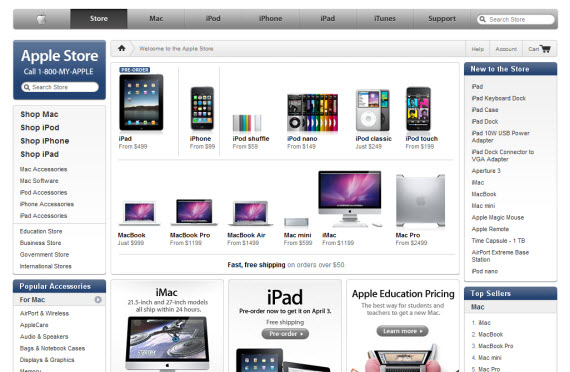
3. Apple Store
Make it easy and quick.


Apple is known for well designed products. The Iphone, Ipod and Ipad are not just well designed but they are easy to use. And that spirit is showcased on Apple online store.

The menu at the top is designed to help a visitor go straight to the product he is interested in.

Make it easy for buyers to find what they are looking for.

4. Petflow.com
If you are selling hundreds of products you should go with a design similar to petflow.com.

They sell hundreds of pet brands and they have a list of all the available brands at the bottom of the homepage. If you want a particular brand you just click on the name and you go straight to the product.

It is a nice way of solving the problem of how to promote hundreds of products.

Saturday, 22 September 2012

Successful Bluehost Web Hosting Affiliates Making $20,000 Per Month

Bluehost affiliate program is one of the most popular web hosting affiliate program. They pay affiliates $65 for every successful lead.

One of the most successful blogger promoting Bluehost is Pat Flynn from smartpassiveincome.com. Pat Flynn makes on average $20,000 per month from bluehost affiliate program. 

This is how he does it. 

Devout Followers Vs Google Visitors
If your blog has regular readers who passionately follow your blog post you have a better chance of making money from bluehost affiliate program. Affiliate products work best on blogs with devout readers while Google adsense seems to work best on blogs that get a ton of traffic from search engines like Google. 

Pat Flynn blog has a community of readers interested in making a passive income online. Pat teaches them how to make money online using a blog or website. 

If you devout your attention on developing a loyal blog community and not chasing Google traffic, you stand a better chance of making money from bluehost or any other affiliate program.

Trust : Trust : Trust
Your readers need to trust you if you hope to be successful from promoting bluehost web hosting. Pat has an about page on his blog, he uses his real name, he has a picture of himself on the blog and he is very transparent on how much money he makes online.

For readers to trust you, make sure you have an about page, don't use your nick name as your byline and have your picture on your about page. You can go a step further and link to your Facebook page, Twitter and Google + page.

Don't rely on banners
The mistake most affiliates of web hosting make is pasting banners on their website/blog.  It is okay to put a banner on your side bar but make sure you do what Pat Flynn has done. Pat has written many post on how bluehost works. Inside those post there is an affiliate link to bluehost.

Honest Recommendations
It helps if you promote products that you use. If you don't use them at least they should be products that you are familiar with.

Have a resource page
The majority of Pat Flynn bluehost conversions come from Smart Passive Income blog resource page. This is the page where he details all the products he has used. This is the second most visited page in his blog. And he adds, 
If you’re not utilizing a resource page for your niche on your site, you’re crazy! It’s the ultimate non-aggressive way to earn money leaving all parties happy in the end.
Traffic
Blog Visitors = money. Not every visitor will convert but the more visitors to your website the better your chances of making money. The key for getting more visitors to your website or blog is provide value. Write quality posts and write often. 

Make an effort to convert Google visitors into regular readers. You do that by asking visitors to subscribe to your newsletter and encouraging them to leave comments. Make sure your social buttons (facebook, twitter and Google +) are visible on your site. 

To your success!